Lessons, members
and studio pay,
in one app.
Mark a lesson done and Wonynote deducts the session and updates what each studio owes you. Built for independent Pilates, yoga and fitness instructors, so you can stop juggling spreadsheets and calculator math.

Made for the way instructors actually work
Not studio software. A personal app for the instructor who teaches across several studios.
Pilates instructors
Private, duet, trio and group rates, plus reformer and mat sequences.
Personal trainers
Class packs that count down by themselves, and before/after photos.
Yoga teachers
Classes at different studios in one calendar, and a pose library.
Contract instructors
A different rate at every studio, tracked in one place, with yearly totals by studio.
Save the lesson,
and your note reaches your member's phone
Your members install the same Wonynote app and choose "Member" when they sign up. It's free for them.
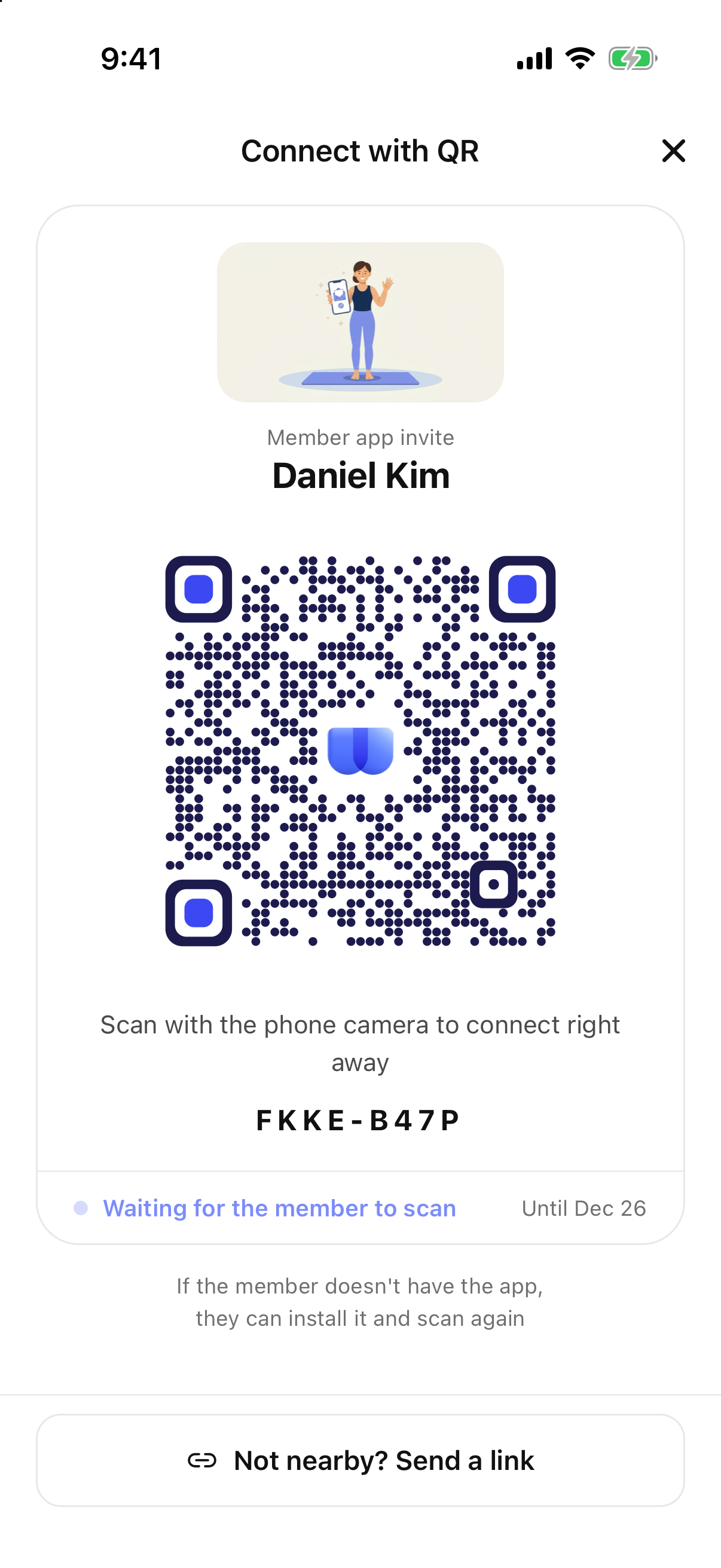
Invite by link or QR code
Your member scans it with their phone camera and you're connected.
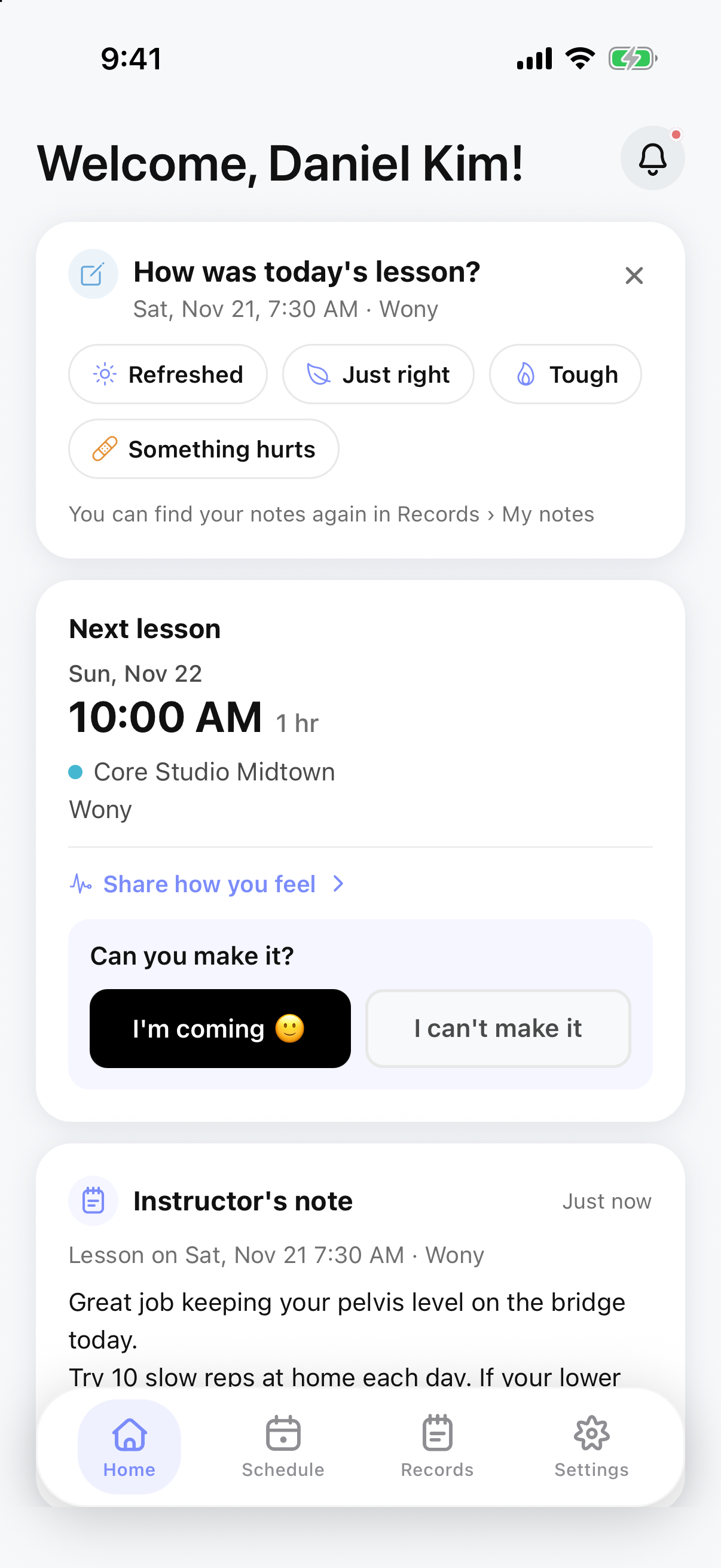
Next lesson, "I'll be there" and your notes
Right on your member's home screen.
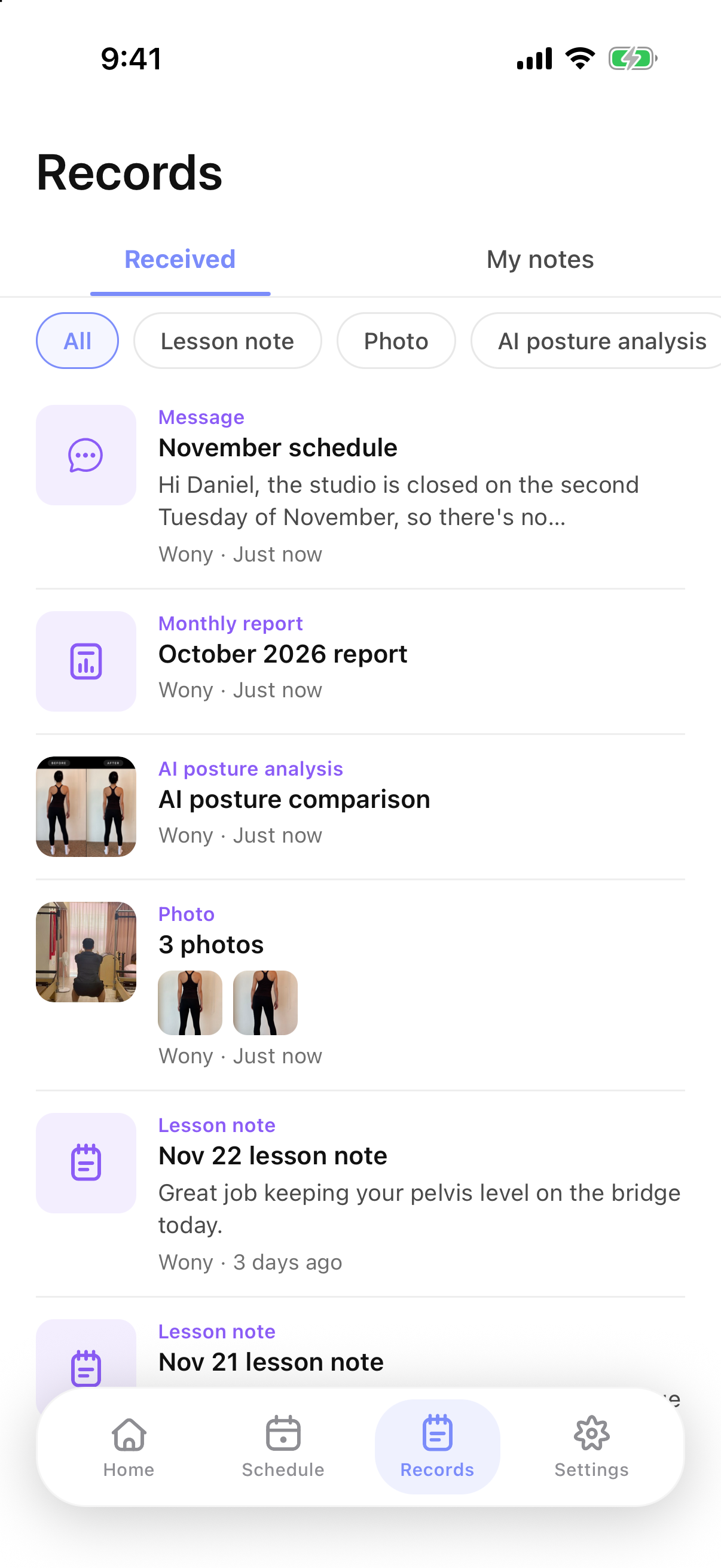
Received records
Lesson notes, photos, AI posture analyses and reports, kept in one place.
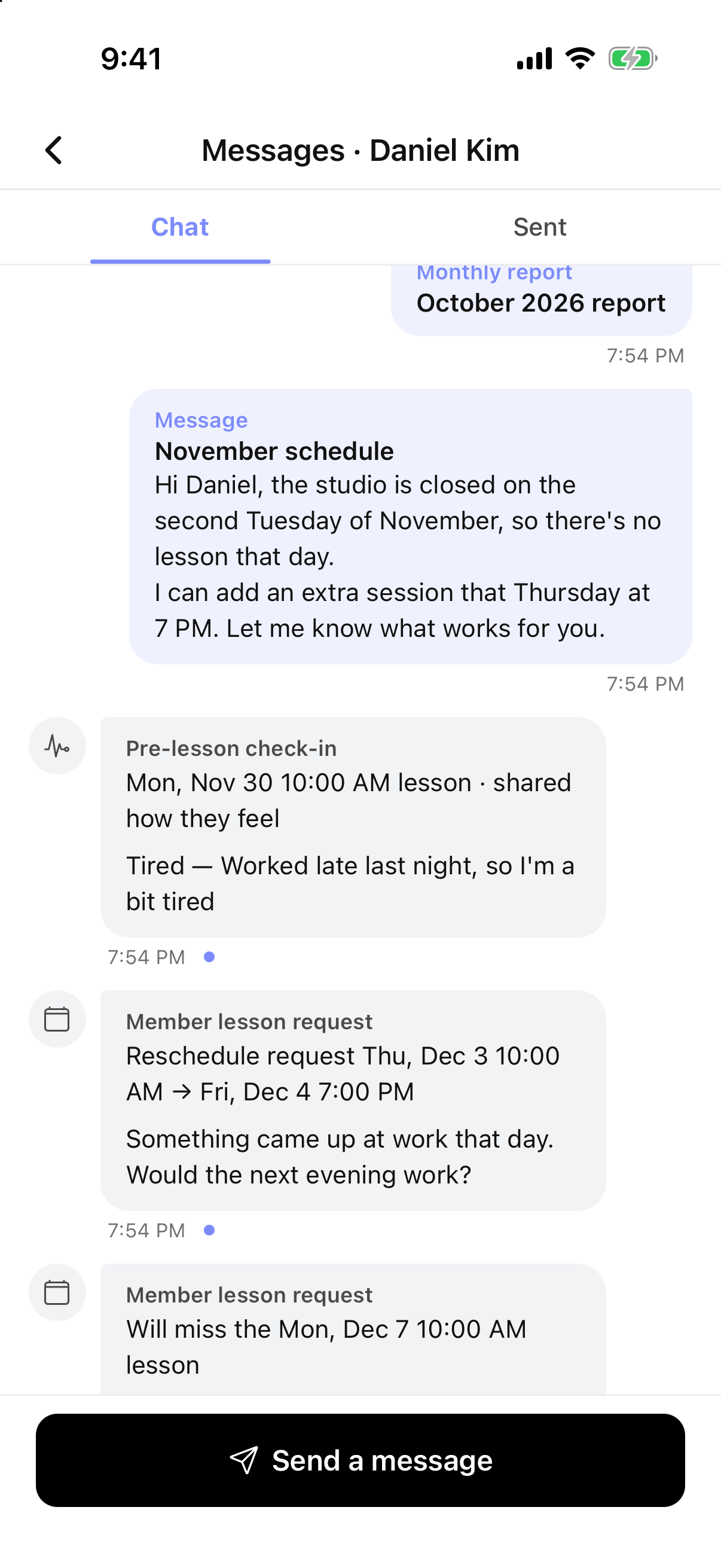
One conversation per member
Condition, requests and replies from your member, all together.
For you
-
Connect with a link or QR code
Text an invite link, or show a QR code to the member standing next to you.
-
Your note goes out when you save the lesson
The "Note for your member" is sent with the lesson, and finished lessons show the day's exercises with illustrations. Photos, AI posture analyses and monthly reports are sent after a preview of what your member will see.
-
Absences and time changes in one place
Absence notices and time change requests arrive together and take one tap to handle. You can close time changes a set number of hours before class.
For your members
-
Next lesson, sessions left, your latest note
No more "How many sessions do I have left?" messages.
-
"I'll be there," the evening before
At 8 PM the day before, members answer "Can you make it?" If they can't, they send an absence notice or ask for another date and time.
-
Homework check-ins
Members tick off the homework you gave each day, and you see how many days they did it before the next lesson.
The member app is free for members. You can connect up to 3 members and send them everything without Pro. Pro is needed from the 4th connected member.
Connected members see only their own lessons and what you send. Your lesson notes, member notes, health information and pay stay private.
Everything an independent instructor needs
No more spreadsheets or paper sign-in sheets. Spend your energy on teaching.
Studio pay, calculated for you
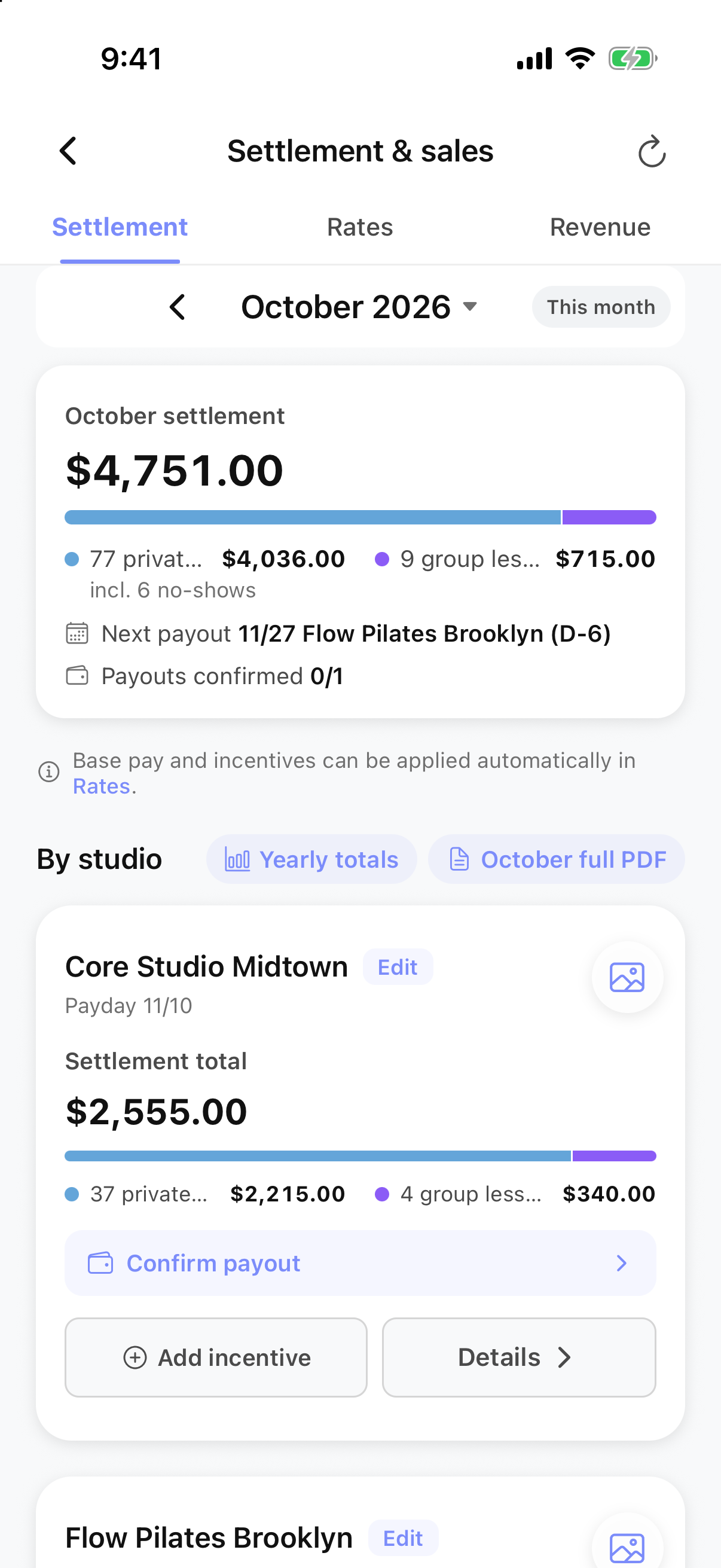
Mark a lesson done and your expected pay updates right away, studio by studio. Set rates by lesson length (50 or 60 min), by group size, or as a percentage of what the member paid, and see exactly which rate each lesson used. The top of your settlement shows this month's total, take-home pay and the next payday. Past lessons that are still marked as scheduled are gathered so you can clear them in one pass.
A calendar that follows you
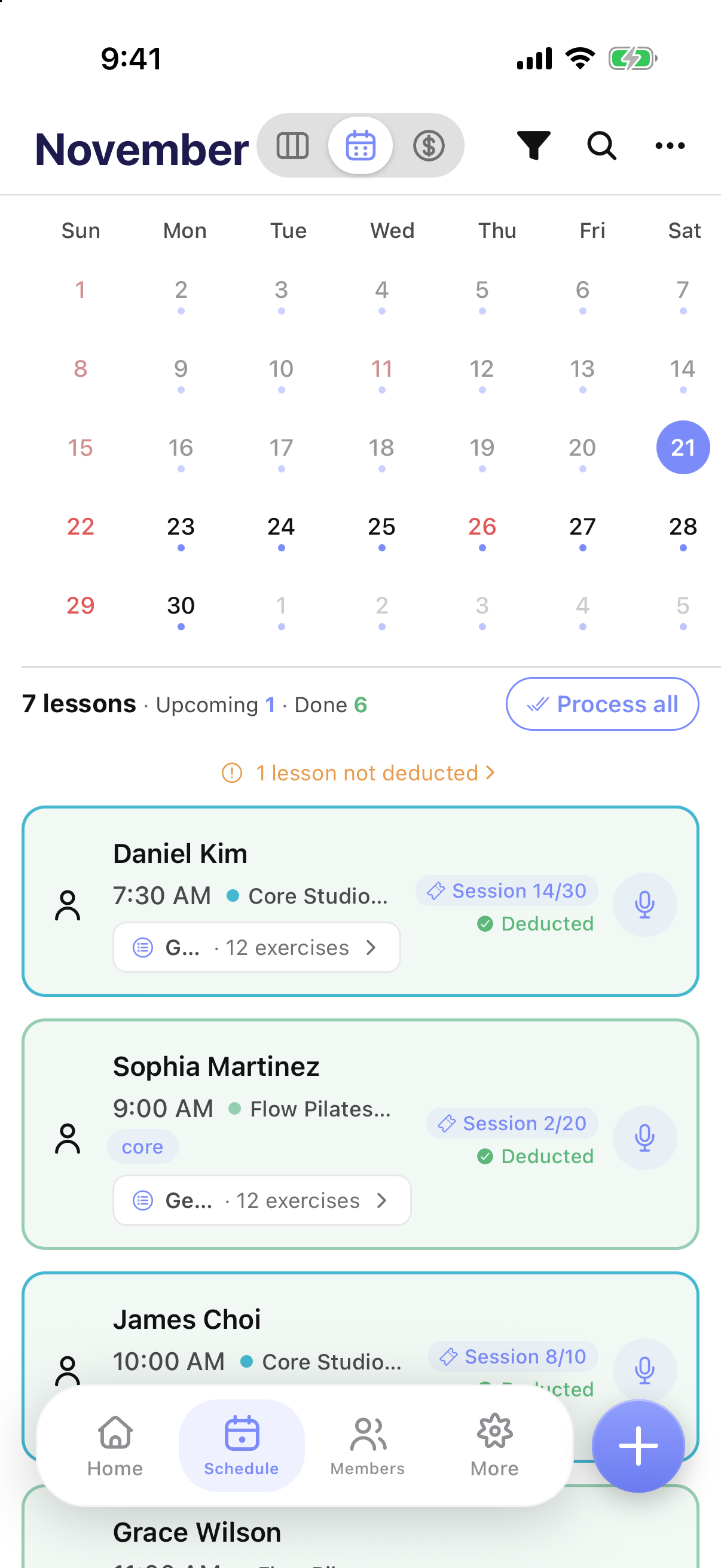
Day, week and month views, recurring lessons, copy and search. Pick your home time zone and every lesson time in the app follows it.
Class packs and monthly memberships
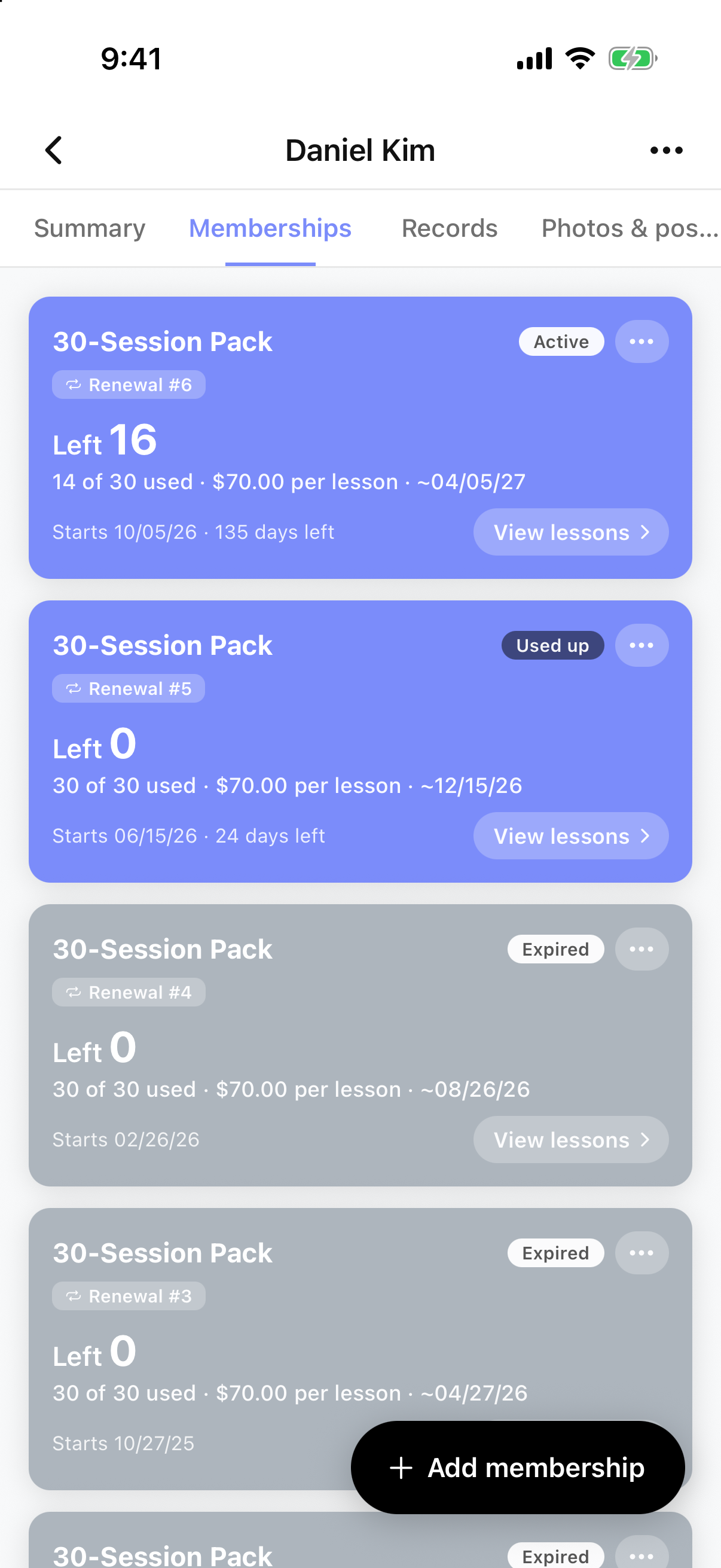
Class packs, monthly memberships (4, 8, 12 or unlimited) and auto-renewing plans. Sessions are deducted automatically for each member in private, duet, trio and group lessons, and late cancels and no-shows are recorded with a reason.
AI posture analysis & before/after
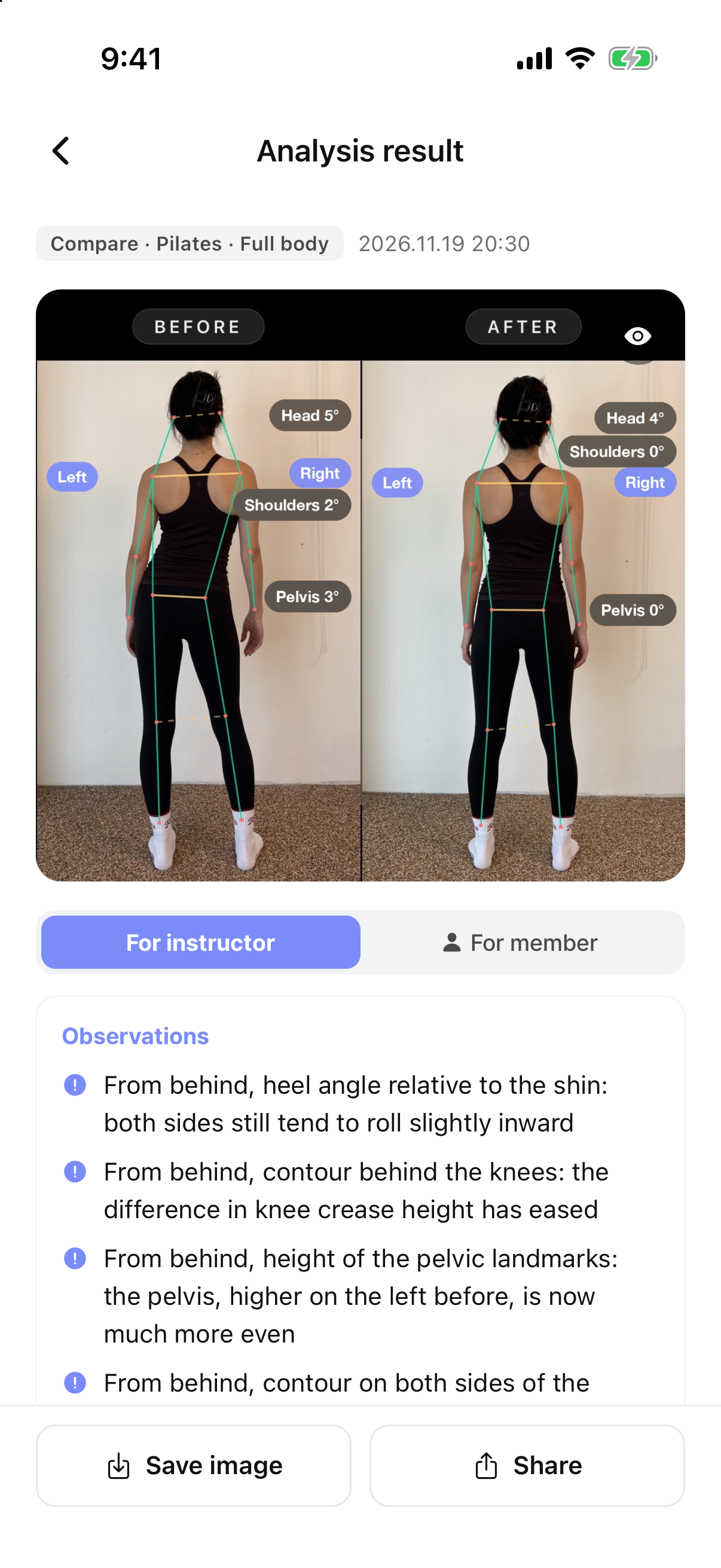
Analyze front, side and back photos to measure shoulder and pelvic tilt, knee angle and left-right balance, with plain-language notes for you or for your member. Muscles it mentions are shown on location illustrations, and the recommended exercises can become an AI lesson draft from warm-up to cool-down. Compare two photos or two videos side by side to see what changed (Pro).
AI notes are a coaching aid, not a medical diagnosis. Health information in a member's pre-lesson check is never sent to AI.
The note you leave after class
shows up before the next one
No digging for where you wrote it. When a member's next lesson comes up, your last notes appear on the home screen card.
-
01 · After class
Write it down
Add a note when you mark the lesson done. Speak it instead and AI turns it into a clean lesson note (Pro). Things to prepare go into a separate prep note.
-
02 · Before the next lesson
See it again
The next-lesson card shows a lesson brief: your prep note, the last lesson, and moments like a last session or a birthday.
-
03 · Months later
Look back
Member notes and the member journey show everything from the first lesson to today. Send a month of lessons as a monthly report (Pro).
And there's more
Start free and add Pro only when you need it
Pay & settlement 5
Yearly totals by studio
See what each studio paid you over the year, and save it as a PDF. Handy when you match your 1099s at tax time.
Payout confirmation
When a studio's payday arrives, confirm the payout with one tap, or enter what actually arrived. The card keeps the difference from what you expected, so checking deposits from several studios takes minutes.
Pay calendar
Switch the schedule to the pay view and every day shows its lessons and earnings. Tap a date to open that day's breakdown.
Your currency
Track rates, class pack prices and pay in US dollars, Japanese yen or Korean won. Choose it in the app's Region settings.
Hide amounts with Face ID
Earnings open hidden, so nothing shows when a client glances at your phone. Tap "Show" and confirm with Face ID, Touch ID or your passcode.
Lessons & schedule 5
Duet & trio lessons
Choose 1:1, duet (1:2) or trio (1:3). Each member's own membership is deducted, and each studio can have its own duet and trio rates.
Studio days off
Mark a day or a date range off for one studio or for all of them. Overlapping lessons are canceled in one go without deducting sessions, and connected members are notified.
Show lessons in Calendar
Your lessons appear in your phone's built-in calendar and stay in sync when you add, edit or cancel them.
Widgets & Live Activity
Check today's lessons from the Home Screen. On iPhone, a lesson card appears on the Lock Screen and in the Dynamic Island before each lesson.
Studio notes
Keep door codes, Wi-Fi, studio rules, contracts and contacts for each studio. Sensitive items stay hidden until you unlock them.
Members 5
Pre-lesson check & posture assessment
Record health notes, injury history, lesson goals and equipment settings such as reformer springs. Health information is saved only after you confirm the member's consent, and it is stored encrypted.
Body measurements
Track weight and measurements in lb / in or kg / cm, with progress charts you can choose to share with your member.
Members to check
Members with 2 or fewer sessions left, a membership expiring within 7 days, or no lesson for two weeks are gathered in one list, ready for a renewal message.
Member journey
One timeline from a member's first lesson to today: milestones, renewals, notes and photos, ready to open in a renewal conversation.
Message templates
Save the messages you send again and again. Pick a member and their name, sessions left and expiry date are filled in, ready to copy into any messenger.
AI & tools 6
Sequences & exercise library
Build warm-up, main and cool-down sequences from a Pilates, fitness and yoga library with illustrations, cueing and target muscles. Let AI draft one for your equipment and lesson length (Pro), then share it as a single image.
Muscle atlas Pro
43 muscles with location illustrations, origins and insertions, fascial lines, and the exercises that use them.
AI voice notes Pro
Talk after class and get a clean lesson note. Your voice recording is not stored.
AI credits
Use AI without subscribing. Credits come in packs of 10, work for every AI feature and never expire.
Instructor portfolio Pro
A profile filled in with your lesson and retention stats, certifications and photos. Export it as a PDF or share it as an image card.
iPad, tablets & foldables
On large screens, the list and the details sit side by side in a split view.
See it in action
Real screens from the app
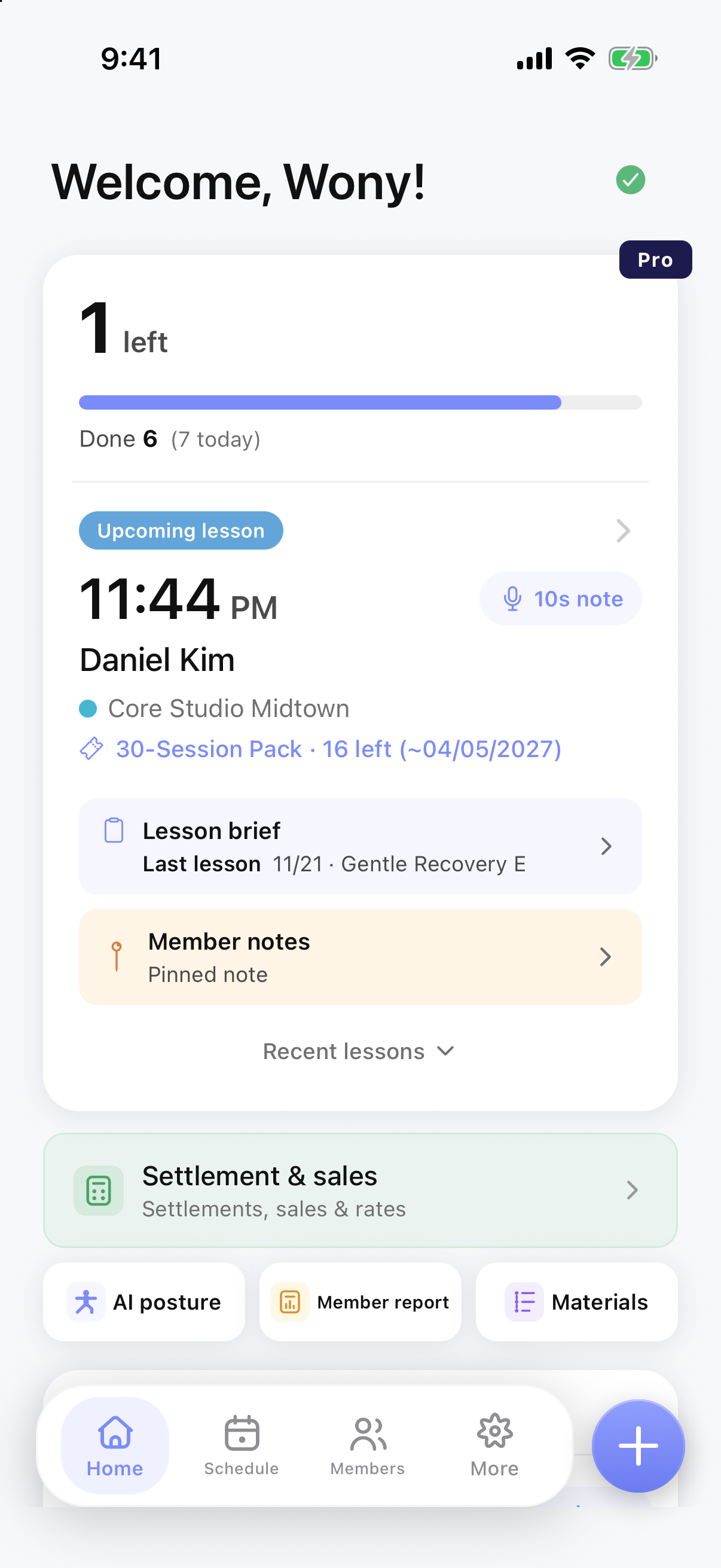
🏠 Home dashboard
Today's lessons and what's next
- Lessons left today and your next lesson at a glance
- Membership status and the last lesson's brief before you start
- Pinned member notes one tap away
📅 Schedule & attendance
Mark lessons done in one tap
- Month, week and day views
- Weekly recurring lessons set up once
- Mark done or no-show and the membership is deducted for you
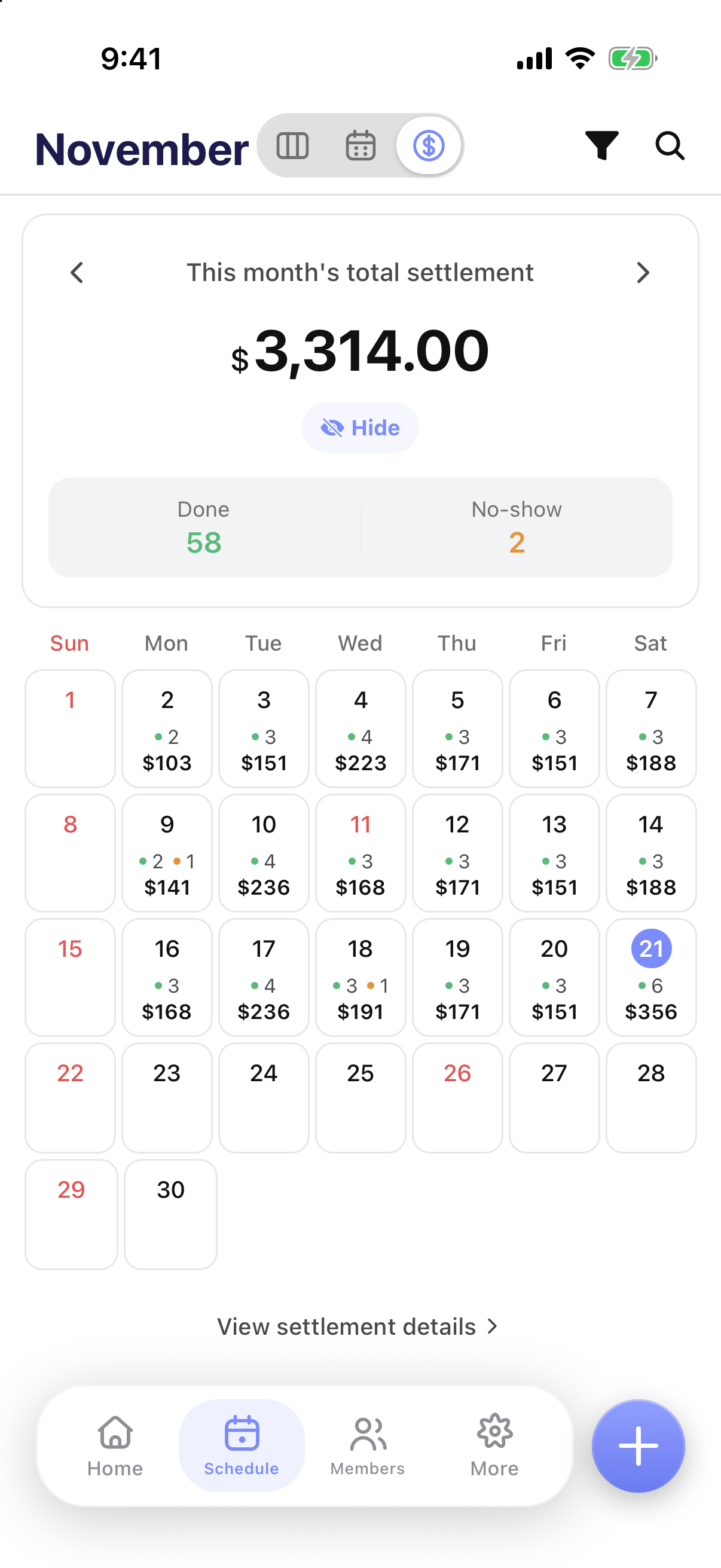
🗓️ Earnings calendar
What you earned, day by day
- Every day on the calendar shows lessons and earnings
- Monthly total with completed and no-show counts
- Hide amounts with one tap
💰 Monthly settlement
Pay worked out per studio
- Private and group lessons totaled separately
- Your own rates per studio, plus incentives
- Next payday and payout check
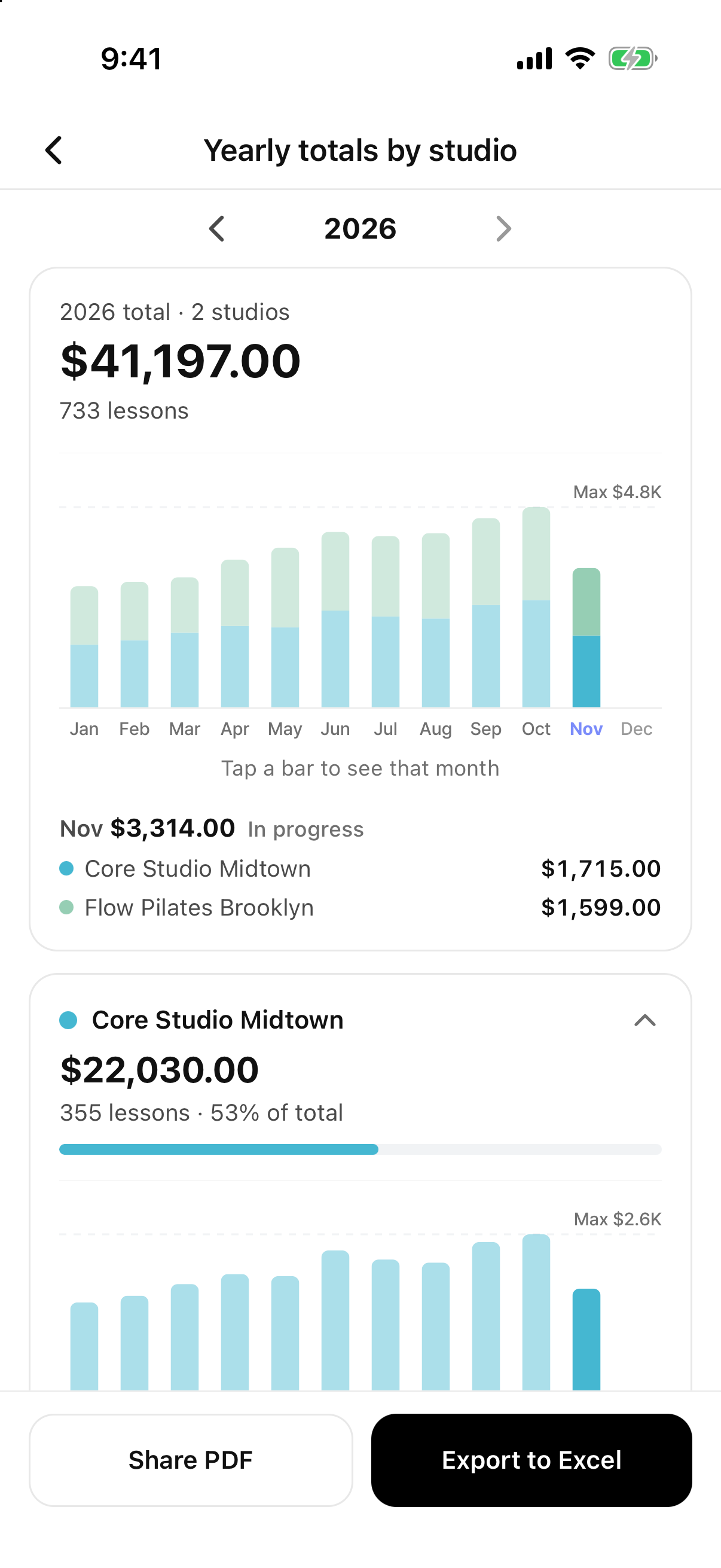
📊 Yearly totals by studio
Your whole year in one chart
- Monthly totals for each studio across the year
- Share as PDF or export to Excel
- Handy when it is time to file taxes
✨ AI posture analysis
One photo to read, two to compare
- Before and after side by side with body landmarks
- Separate explanations for you and your member
- Save as an image or share it
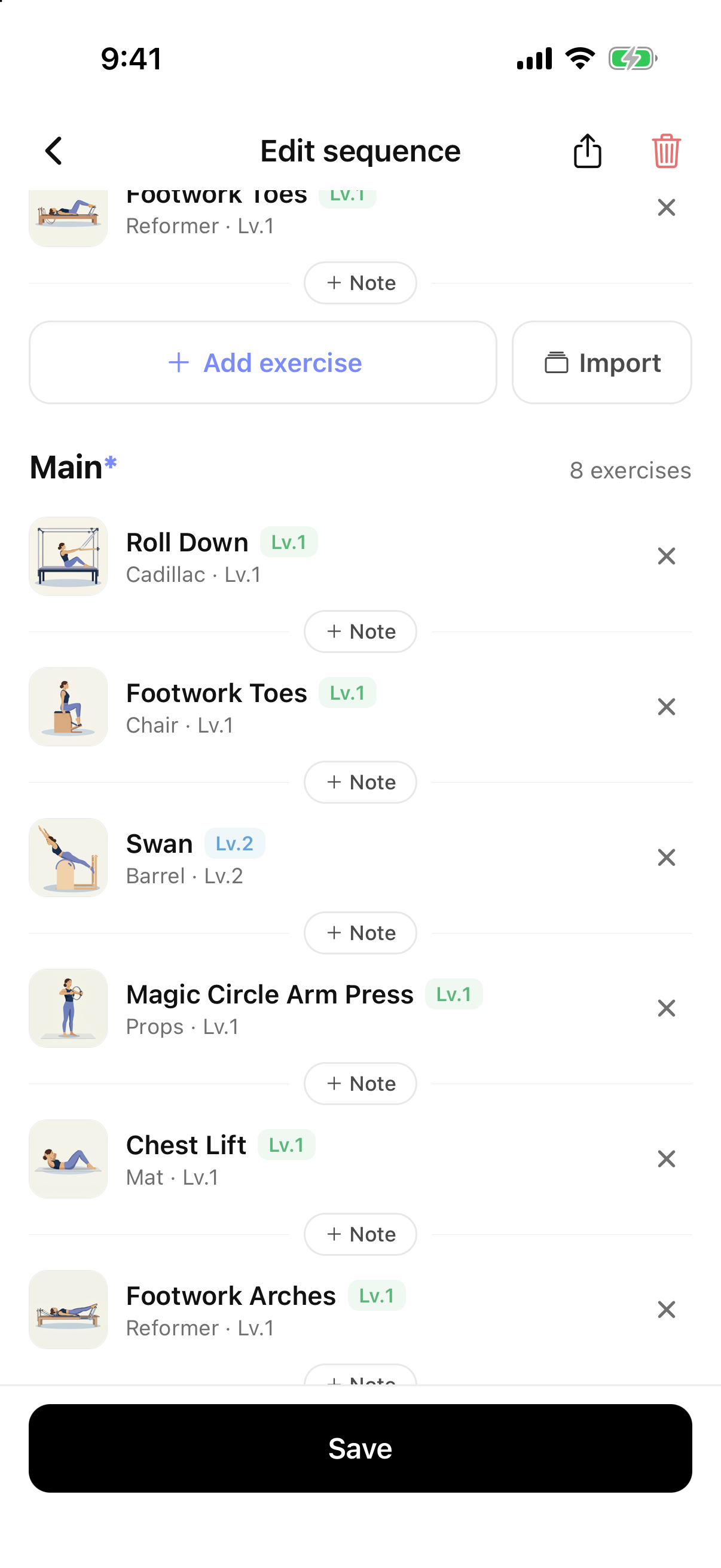
📋 Lesson sequences
Plan lessons from an exercise library
- Build sequences by apparatus and level
- Add a note to any exercise
- Reuse and import sequences you already made
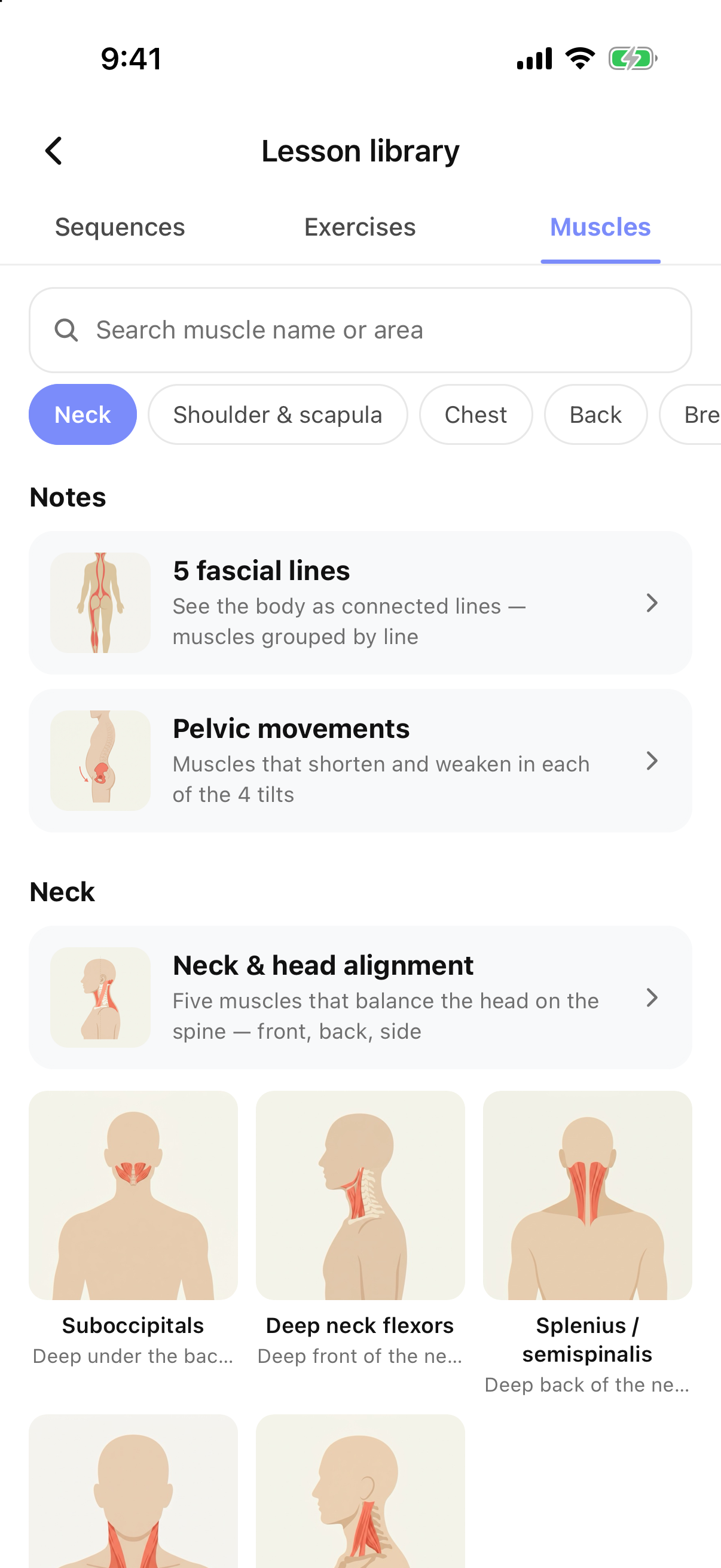
🫀 Muscle library
Look up anatomy mid-lesson
- Search by muscle name or body area
- Fascial lines and pelvic movements explained
- Illustrated muscles for each area
👥 Members & memberships
Packs, renewals and history in one place
- Sessions left, price per lesson and expiry date
- Every renewal kept in order
- Session packs and monthly memberships
📱 Member app
Members see their next lesson and your notes
- Next lesson with a one-tap "I'm coming" reply
- Your notes after each lesson
- Members tell you how they feel before class
🏠 Home dashboard
Today's lessons and what's next
📅 Schedule & attendance
Mark lessons done in one tap
🗓️ Earnings calendar
What you earned, day by day
💰 Monthly settlement
Pay worked out per studio
📊 Yearly totals by studio
Your whole year in one chart
✨ AI posture analysis
One photo to read, two to compare
📋 Lesson sequences
Plan lessons from an exercise library
🫀 Muscle library
Look up anatomy mid-lesson
👥 Members & memberships
Packs, renewals and history in one place
📱 Member app
Members see their next lesson and your notes
Settled in three steps
Add your lessons
Add members and your schedule, and set a rate for each studio and lesson type.
Mark them done
One tap after class. The member's remaining sessions go down by themselves.
Check your pay
See this month's pay for every studio, and export the details to Excel or PDF.
Start free. Go Pro when you're busy.
The basics are free. Pro is for when you settle 30 or more lessons a month. Prices are shown in your local currency in the App Store and Google Play.
Free
To get started
- Lessons and schedule
- Members and memberships
- Member app for up to 3 members
- Settlement for fewer than 30 lessons a month
- 5 sequences and the exercise library
- Tablet and foldable split view
- Excel/PDF export
- Revenue analysis
- Instructor portfolio
Pro Monthly
When your schedule fills up
Local price shown in the store
- Everything in Free
- Unlimited settlement
- Unlimited member app connections
- Excel/PDF export
- Settlement grouped by time or rate
- Revenue analysis
- Monthly recap on the 1st
- Muscle atlas
- Unlimited AI (posture and video analysis, before/after, voice notes, sequence drafts)
- Instructor portfolio
Pro Yearly
Best value
Local price shown in the store
- Everything in Pro Monthly
- Costs less per month than paying monthly
Every Pro plan starts with a 2-week free trial, and you can cancel anytime in your App Store or Google Play subscriptions.
Questions, answered
What is Wonynote?
Wonynote is a lesson, member and pay tracker for independent Pilates, yoga and fitness instructors. Mark a lesson done and the member's session is deducted and your pay for that studio is calculated from the rate you set. It also covers memberships, lesson notes, a free member app, AI posture analysis and sequence building.
Who is it for? Is it studio management software?
It's built for the individual instructor, especially one who teaches at several studios with a different rate at each. It is not a studio booking or payroll system for owners who manage many instructors.
What is the member app?
Your members install the same Wonynote app and choose "Member" when they sign up. Once connected, they see their next lesson, remaining sessions and your latest note, and can look back at the lesson notes, photos, AI posture analyses and monthly reports you sent. They can reply "I'll be there" the evening before, send an absence notice or ask for a different time, and check off homework. Your lesson notes, member notes, health information, posture assessments and pay are never shown to them.
How do I connect with a member?
Open the member, create an invite and send the link by text or any messenger. The member is connected as soon as they open the link or enter the code (an invite code works once, within 30 days). If the member is next to you, show the QR code and let them scan it with their phone camera. One member can connect with more than one instructor.
Is the member app free? Do I need Pro?
The member app is always free for members. You can connect up to 3 members and send them everything without Pro. Connecting a 4th member requires Pro. If Pro ends, records you already shared stay visible, and your first 3 connected members keep receiving new ones.
Can I use dollars and my own time zone?
Yes. In the app's Region settings you can choose your currency (US dollar, Japanese yen or Korean won) and the time zone your lessons follow. Times on screen follow your device, so lessons stay at the right local time.
Which languages and sign-in options are supported?
The app is available in English, Japanese and Korean, and you can switch languages in the app's Region settings. You can sign in with Apple, Google, LINE or Kakao.
How is my members' health information protected?
Health notes can be saved only after you confirm the member's consent. They are stored encrypted, used only to prepare for lessons, never sent to AI features, and never shown in the member app. See our Privacy Policy for details.
How do I cancel Pro?
Subscriptions are handled by the App Store and Google Play. Cancel anytime from your subscriptions there, at least 24 hours before renewal. You keep Pro until the end of the period you paid for.
Leave the admin to Wonynote
Save your time and energy for teaching.
Scan with your phone camera
Opens the App Store
or Google Play
